Wi-Fi or hotspot, not Bluetooth
Connect both devices to the same Wi-Fi network, or connect the second device to the host’s phone hotspot. This game uses a browser-to-browser connection; Bluetooth pairing is not supported. There is no public lobby or automatic matchmaking.
Some guest Wi-Fi networks, hotspots, firewalls or local-network permissions prevent devices from reaching each other. Being connected to the same network name does not guarantee that pairing will work.
Pair the two devices
- Host: choose the game. On the homepage, select a title and choose Host Two Players. Wait for the invite code, then copy or share it with your partner.
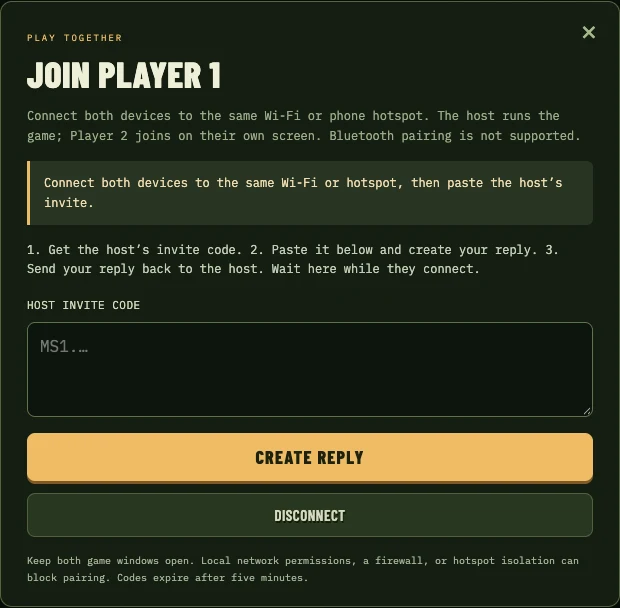
- Player 2: create a reply. Open this site on the second device, choose Join as Player 2, paste the host’s invite, then choose Create Reply. Copy or share the reply back.
- Host: finish connecting. Paste Player 2’s reply into the connection dialog and submit it. Keep both game windows open while the connection completes.
- Start playing. Press the bottom A / FIRE button, labelled START or CONTINUE when needed, on each device to join the arcade game. Use A / FIRE to confirm each player’s character.
Invite and reply codes expire after five minutes. If a code expires, disconnect and create a fresh pair. These private connection codes are different from a public link to a game page; share them only with your playing partner.
During the session
The host controls Player 1 and the second device controls Player 2. Each person can adjust controls on their own device. Automatic continues is a per-device preference. Pressing the bottom A / FIRE button when it says START or CONTINUE includes a free credit. START / CONTINUE is also available in the pause menu.
Keep the host in the foreground: its browser runs the game and sends the picture. Switching apps, locking the screen or losing the network can interrupt play. Camera and microphone access are not required. Solo save-state controls are unavailable during multiplayer.
Disconnect, retry or return to solo
Open Two-player Connection from the pause menu and choose Disconnect. Return to the library to start a solo session or pair again. Do not keep retrying an old code after restarting the host; generate a new invite and reply.
If the pair fails, check local-network permission and try a different shared Wi-Fi or hotspot. If it connects but is laggy, keep the devices near the access point, reduce other network traffic and try a more capable host. Read the connection checklist.